What Is MCP (Model Context Protocol), and Does Your Business Need an MCP Server?
By GreyloopsPublished 14 min read
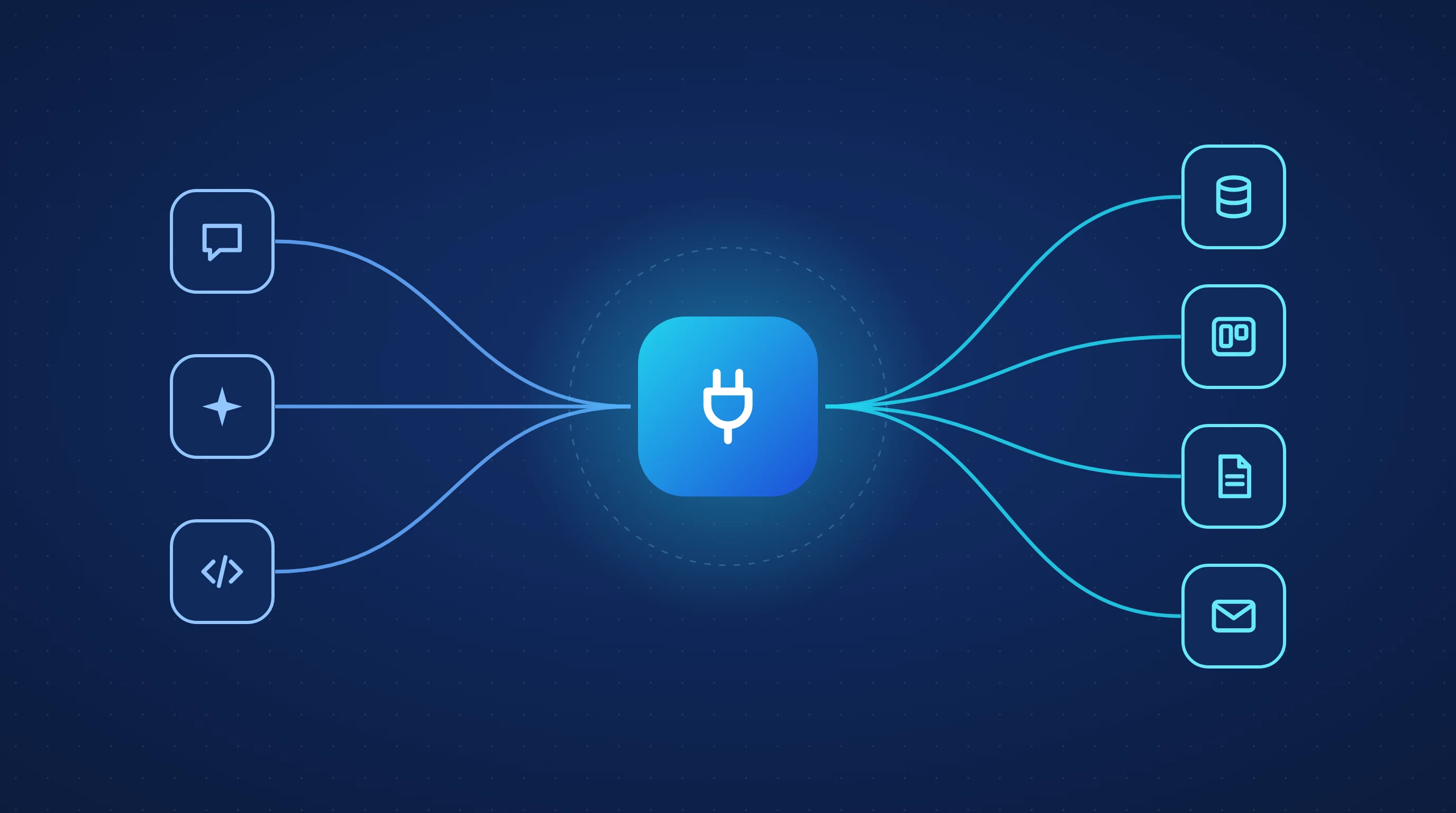
A year ago, connecting an AI assistant to your CRM, ERP or internal database meant writing a custom integration for each assistant. Today most of the major AI assistants speak one shared protocol for that job: MCP. If your team uses ChatGPT, Claude, Gemini, Copilot or Cursor, MCP decides how easily those tools can work with your systems. If you sell software, it decides how easily your customers' AI assistants can work with your product.
This guide explains what MCP is, how it works, where it stands at the end of 2026, the security risks most articles skip, and how to tell whether your business should connect to, build or publish an MCP server.
Quick answer: what is MCP?
MCP (Model Context Protocol) is an open standard that lets AI applications connect to outside tools and data in one consistent way. A business system exposes what it can do through an MCP server. Any AI app that supports MCP can then discover those tools, read the data it is allowed to see and take actions on the user's behalf.
Most businesses don't need to build an MCP server. They need to connect the official servers their software vendors already provide. Build your own when your important data lives in a custom or internal system, and publish one when you sell software that customers will want to use from their AI assistants.
Key takeaways
- 1
MCP replaces one-off integrations between every AI app and every system with a single shared protocol.
- 2
It is now neutral, open infrastructure: Anthropic donated it to the Linux Foundation's Agentic AI Foundation, co-founded with OpenAI and Block.
- 3
ChatGPT, Gemini, Microsoft Copilot, Cursor and VS Code all support it, and there are more than 10,000 active public MCP servers.
- 4
Security is the main reason companies hold back. Prompt injection through retrieved content is the risk to design around.
- 5
Expose a few well-designed, task-level tools with the narrowest permissions, not every endpoint of your API.
What is MCP?
Anthropic introduced the Model Context Protocol in November 2024 to solve an integration problem. Every AI application needed its own connector to every system it wanted to use. With three AI apps and four business systems, that is twelve separate integrations to build and maintain, and the number multiplies with every new tool.
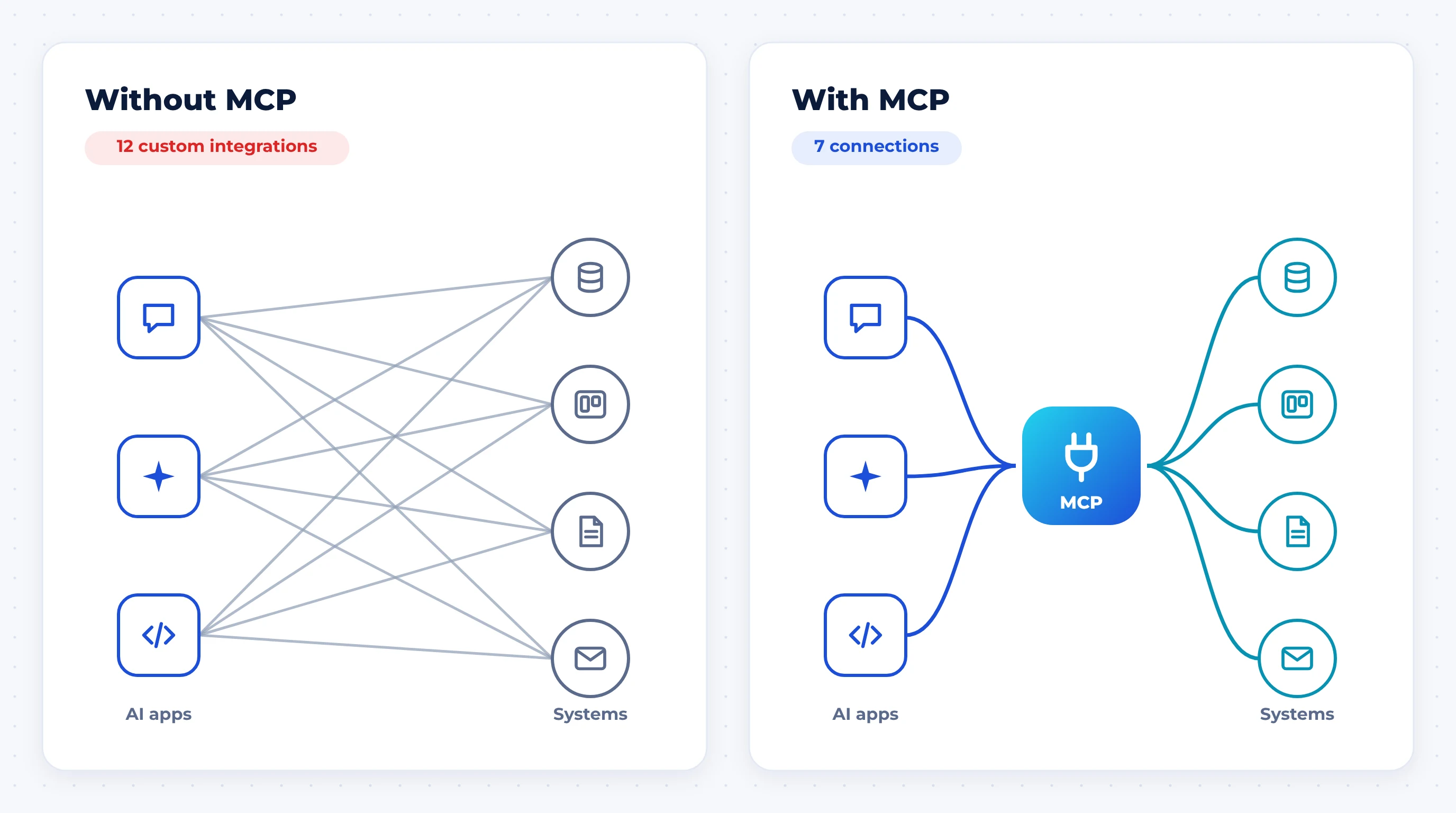
MCP changes the maths from "every app times every system" to "every app plus every system." A system is wrapped in an MCP server once, and any MCP-compatible AI app can use it. People often compare it to USB-C: one standard port instead of a drawer full of different cables.
In December 2025, Anthropic donated MCP to the Agentic AI Foundation (AAIF), a fund under the Linux Foundation. Anthropic, Block and OpenAI co-founded it, with Google, Microsoft, AWS, Cloudflare and Bloomberg as supporters (Anthropic). For a business, that matters: you are building on a standard that no single AI vendor controls.
How does MCP work?
MCP has three parts. You only need to understand them well enough to know which one you would be building.
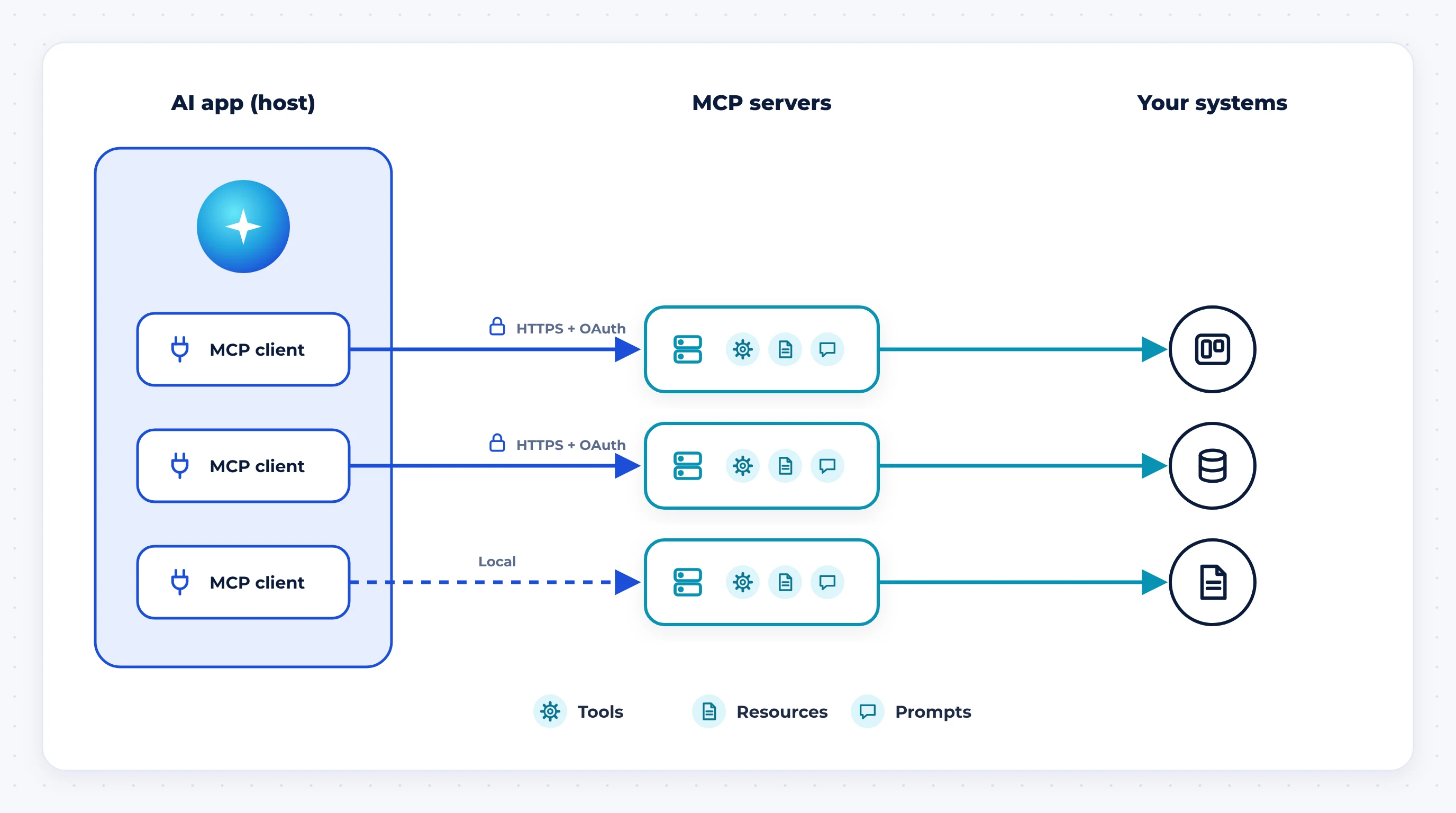
Host: the AI app
The app the person is using: ChatGPT, Claude, Copilot, Cursor, VS Code or your own AI product. The host decides which servers are connected and asks the user for permission before sensitive actions.
Client: the connector inside the app
Each host runs one MCP client per connected server. It handles the conversation between the app and the server. You almost never build this part yourself; the AI app vendor does.
Server: the bridge to your system
An MCP server sits in front of a system such as a CRM, database, file store or internal API, and describes what an AI can do with it. It offers three kinds of building blocks:
- Tools: actions the AI can take, such as "create invoice," "search tickets" or "update deal stage."
- Resources: data the AI can read, such as a document, a record or a report.
- Prompts: reusable, pre-written instructions for common tasks, which users can pick from a menu.
Servers run in two ways. A local server runs on the user's own machine and is useful for files and developer tools. A remote server runs on the web and connects over HTTPS, with OAuth sign-in so each user only gets access to what their own account allows. Most business use cases need a remote server.
The official documentation and specification live at modelcontextprotocol.io.
Who supports MCP in 2026?
MCP has moved from an Anthropic project to standard industry plumbing. When it joined the Agentic AI Foundation, Anthropic reported more than 10,000 active public MCP servers and over 97 million monthly SDK downloads across Python and TypeScript. ChatGPT, Cursor, Gemini, Microsoft Copilot and Visual Studio Code all support it, and AWS, Cloudflare, Google Cloud and Microsoft Azure offer ways to deploy MCP servers (Anthropic).
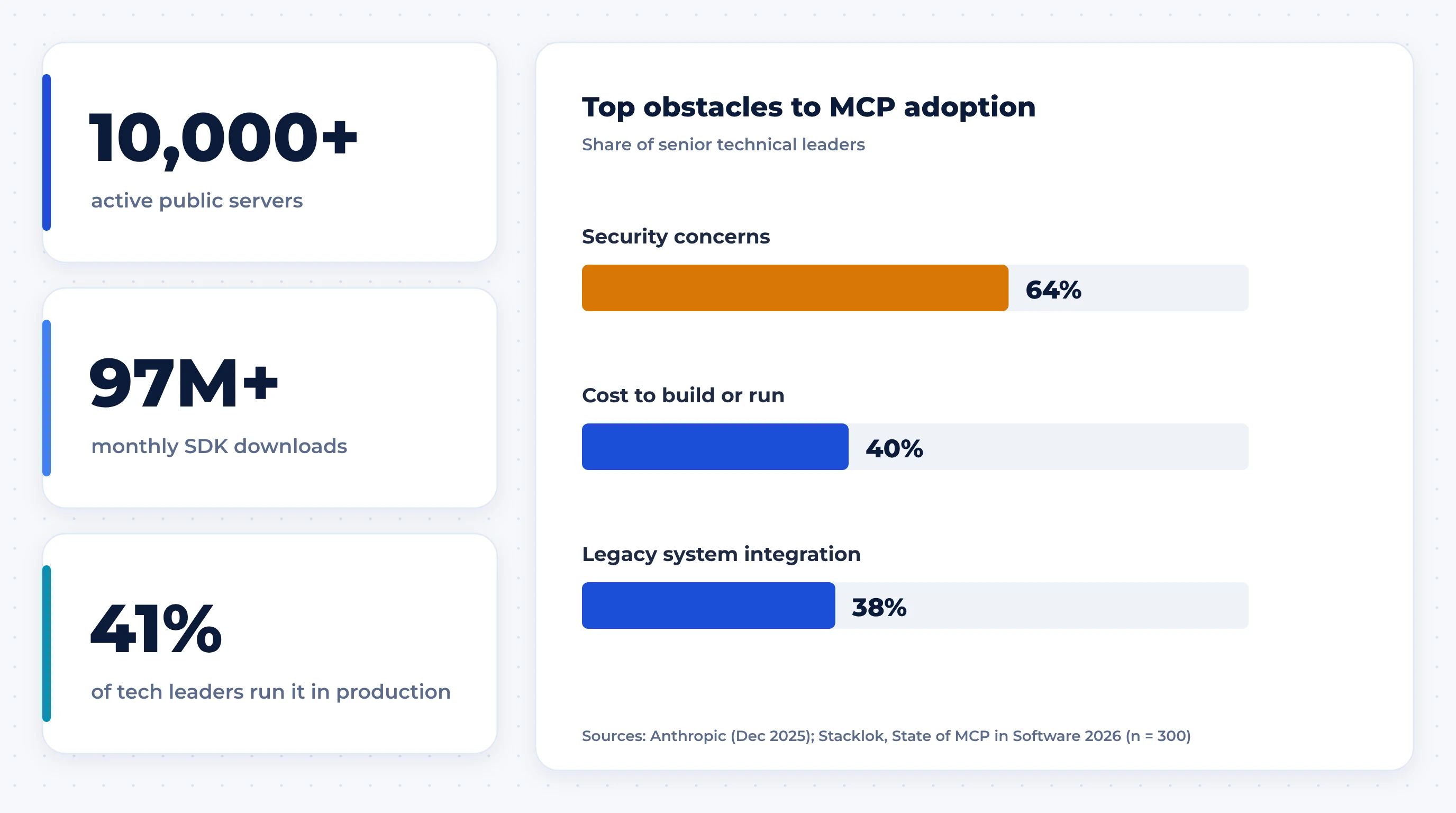
Inside companies, adoption is real but still early. Stacklok's State of MCP in Software 2026 survey of 300 senior technical leaders, run in December 2025, found 29% using MCP in limited production and 12% in broad production use. The biggest obstacles were security concerns (64%), the cost of implementing or running it (40%) and the complexity of integrating legacy systems (38%) (Stacklok).
MCP vs API vs function calling
MCP does not replace your API. In most cases an MCP server is a thin, AI-friendly layer on top of an API you already have.
| Factor | REST / GraphQL API | Function calling | MCP |
|---|---|---|---|
| Built for | Developers writing code | One AI model inside one app | Any AI app that supports MCP |
| Who connects it | A developer, per integration | A developer, per app | The user or admin, by adding the server |
| Describes itself to the AI | No, needs docs and custom code | Yes, inside that app only | Yes, any MCP app can discover the tools |
| Sign-in | API keys or OAuth, varies | Handled by the app | Standard OAuth flow for remote servers |
| Reusable across AI apps | No | No | Yes |
| Best for | System-to-system integration | A single AI feature in your product | Letting many AI assistants use a system |
The short version: your API is how software talks to your system. MCP is how AI assistants talk to it.
What MCP can do for a business
The value shows up when people can ask for work in plain language and the assistant does it inside the systems the business already runs:
- Sales: "Summarise every open deal over $20,000 that hasn't had activity in two weeks and draft a follow-up for each," with the assistant reading and updating the CRM directly.
- Customer support: looking up orders, policies and past tickets in one conversation, instead of switching between four tabs.
- Operations and ERP: checking stock levels, purchase orders or delivery status by asking, and creating a draft order for approval.
- Internal knowledge: answering questions from policies, contracts and project docs with links back to the source.
- Project management: a team that tracks work in Trello or ClickUp can let an assistant read, create and move cards through the tools' MCP connectors, with no custom integration code.
- Engineering: coding assistants that can read tickets, logs, database schemas and documentation while they work.
Does your business need an MCP server? The three paths
"Do we need an MCP server?" is really three different questions. Most businesses only need the first.
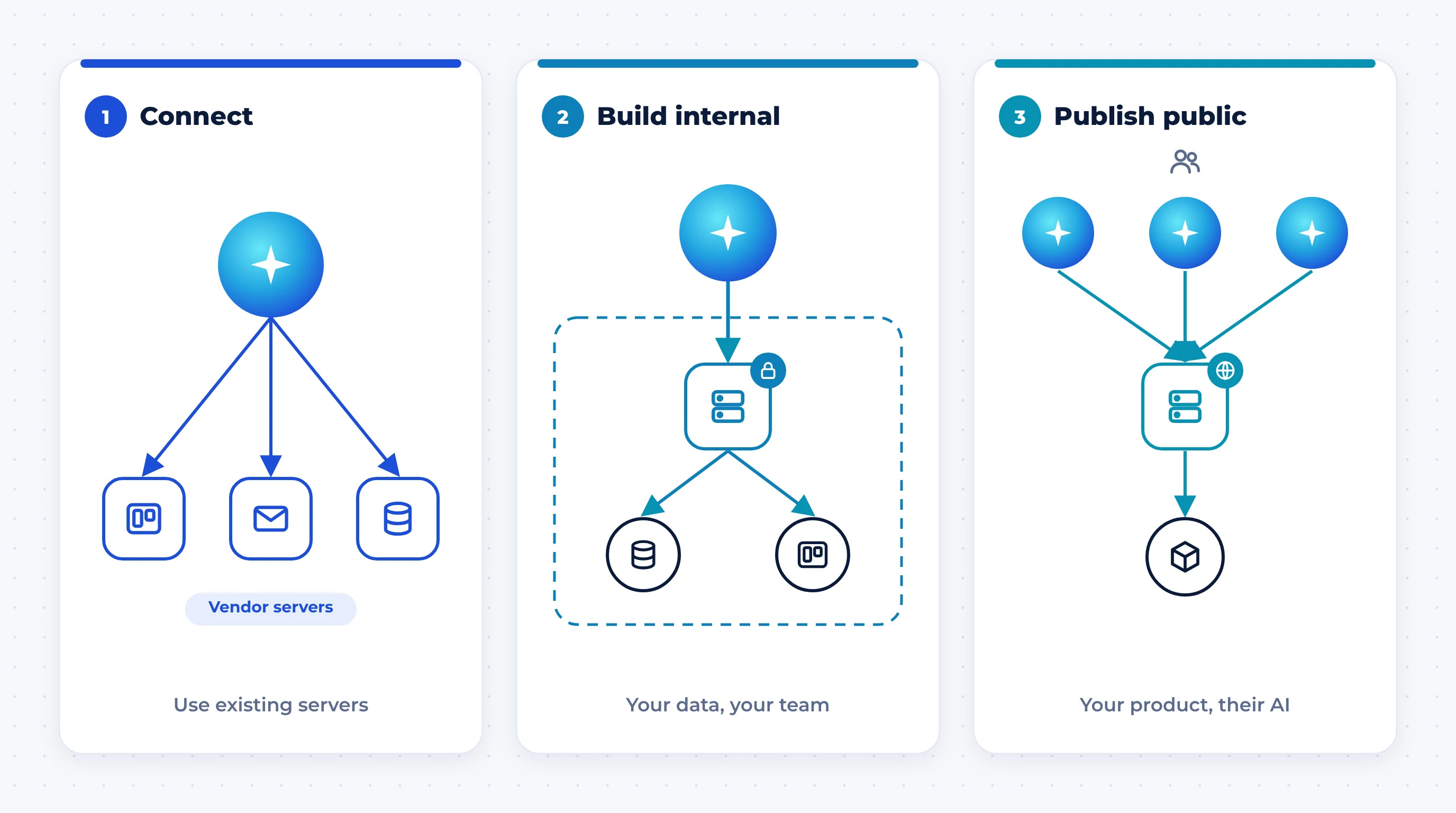
Path 1: Connect existing servers
If your team uses well-known software such as Google Workspace, Microsoft 365, Slack, HubSpot, Salesforce, Notion, Jira, Trello or GitHub, check for an official MCP server or connector first. Connecting one is a settings change, not a development project. The work here is governance: deciding which tools staff may connect and with what permissions.
Path 2: Build an internal server
Build one when the data your team needs lives in something no vendor will write a server for: a custom ERP, an in-house database, a legacy system or your own internal APIs. A private MCP server lets your staff's AI assistants work with that data under your access rules.
Path 3: Publish a public server
If you sell software, a public MCP server lets your customers use your product from inside ChatGPT, Claude, Copilot and other assistants. It is quickly becoming the AI-era equivalent of having a public API, and buyers will start to expect it.
The 4-question test
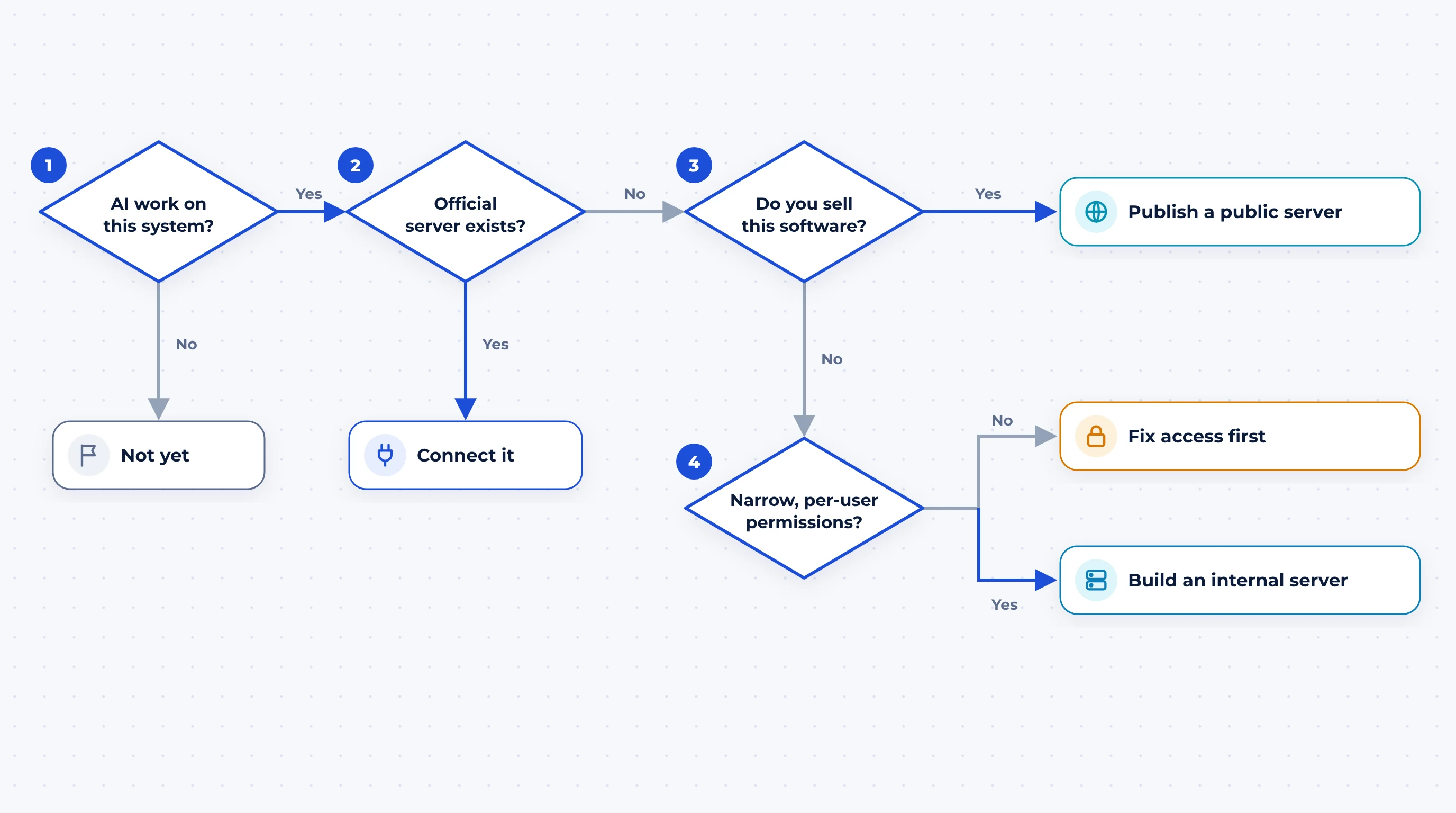
- 1
Do people already want AI assistants to work with this system? If nobody is asking an assistant to read or update it, wait. There is nothing to connect yet.
- 2
Does an official MCP server already exist for it? If yes, connect it and spend your effort on permissions, not code.
- 3
Do you sell this software to customers? If yes, publish a public server, with OAuth sign-in and per-customer permissions from day one.
- 4
Can you give the AI narrow, per-user permissions on this system? If not, fix access control first. An MCP server inherits whatever access you give it. If you can, build an internal server.
MCP security: what can go wrong
Security is the top reason companies hold back on MCP, and with good reason. The main risk is not a hacker breaking into your server. It is an AI assistant being tricked by content it reads.
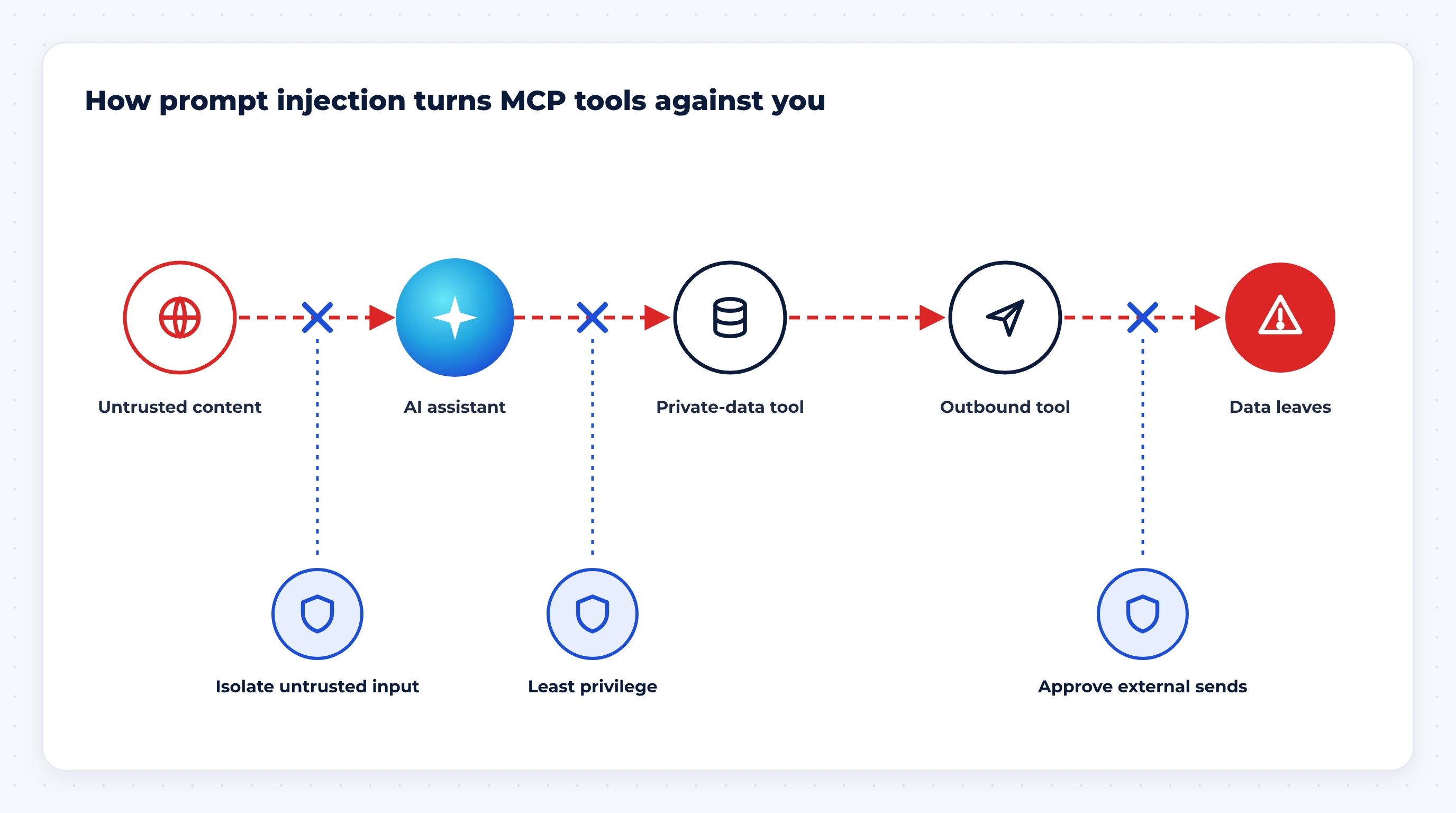
Here is how it happens. An attacker hides instructions inside something the assistant will read during a normal task: a web page, an email, a support ticket or a document. The assistant treats those instructions as part of its job, uses a tool that can read private data, then uses another tool that can send data out.
Researchers who analysed 12,230 tools across 1,360 MCP servers found that 27.2% of the servers exposed capabilities that could be used in this kind of attack, and 9 of the 10 toolchains they tested leaked data in at least one trial. They traced the problem to two missing safeguards: keeping untrusted content apart from sensitive tools, and least-privilege access (arXiv).
MCP security checklist
- Start read-only. Add write actions one at a time, once you trust the reads.
- Use least privilege. Each tool gets the narrowest scope it needs, under the signed-in user's own permissions, never a shared admin key.
- Separate untrusted input from sensitive actions. A tool that reads public content or inbound email should not run in the same session as one that can send data out.
- Require human approval for anything that sends, pays, deletes or shares externally.
- Only install vetted servers. Prefer official vendor servers, review third-party code, and pin versions so a tool description can't change under you.
- Log every tool call with the user, inputs and result, so you can audit and replay what happened.
- Rate-limit and alert on unusual volumes, such as an assistant reading thousands of records in one session.
Design for cost and performance, not just access
A common first attempt is to turn every API endpoint into an MCP tool. That makes the assistant slower, more expensive and less accurate. Every tool description has to be loaded into the AI's working memory (its context window), and every large result passes back through it.
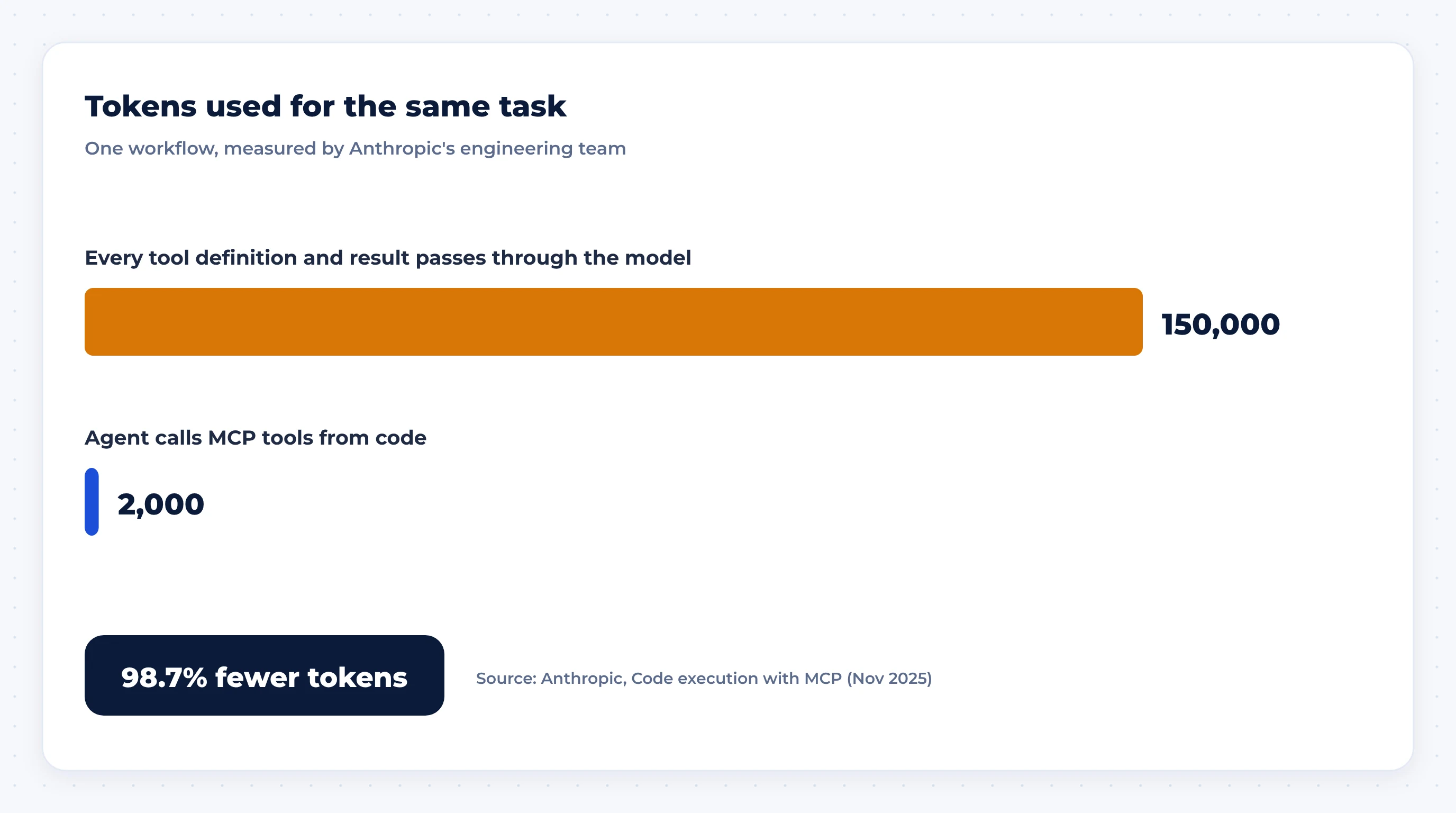
Anthropic's engineering team showed how large the difference can be. In one workflow, letting the agent call MCP tools from code, instead of loading every tool definition and intermediate result into context, cut token use from about 150,000 to about 2,000, a 98.7% reduction (Anthropic).
You don't need that exact technique to get most of the benefit. Good MCP server design follows a few rules:
- Design tools around tasks, not endpoints. One "find customer and recent orders" tool beats five low-level calls the AI must chain together.
- Keep the tool list short. Five to fifteen well-chosen tools usually outperform fifty.
- Write tool descriptions for the AI. Say what the tool does, when to use it, what each parameter means and what it returns.
- Return small, structured results. Summaries, IDs and pagination, not entire tables.
- Make mistakes hard. Validate inputs, use clear enums and refuse ambiguous requests instead of guessing.
How to build your first MCP server
- 1
Pick three to five high-value tasks people would ask an assistant to do with this system. Ignore the rest for now.
- 2
Wrap your existing API. Use an official MCP SDK (Python and TypeScript are the most mature) rather than rebuilding business logic.
- 3
Start read-only, with OAuth sign-in, so every call runs as the real user with their real permissions.
- 4
Add logging, rate limits and alerts before anyone outside the build team uses it.
- 5
Test with the assistants your team actually uses, such as Claude, ChatGPT, Copilot and Cursor, on a fixed list of real requests. Fix tool names and descriptions until the assistant picks the right tool reliably.
- 6
Add write actions behind approval, then widen access team by team.
- 7
For a public server, publish documentation and list it in the official MCP Registry and the directories of the AI apps your customers use.
If your system already has a clean API, a first read-only server is a small project. Most of the effort goes into choosing the right tools, permissions and testing, not code.
Conclusion: connect first, build where it pays
MCP is no longer an experiment. It is the open, vendor-neutral way AI assistants plug into business software, and every major AI platform supports it. For most companies, the right first move is to connect the official servers their tools already offer and set clear rules about permissions. Build a private server when your most valuable data lives in custom systems, and publish one if your customers will want to use your product from their AI assistant. In every case, start read-only, keep permissions narrow and treat anything the AI reads as untrusted.
Explore our AI and integration services
MCP FAQs
What does MCP stand for?
MCP stands for Model Context Protocol. It is an open standard that defines how AI applications connect to external tools and data, so a system only needs to be integrated once to work with any AI app that supports the protocol.
Is MCP only for Claude?
No. Anthropic created MCP, but it is now governed by the Agentic AI Foundation under the Linux Foundation and is supported by ChatGPT, Gemini, Microsoft Copilot, Cursor, Visual Studio Code and many other AI apps.
What is the difference between an MCP server and an MCP client?
The MCP server sits in front of a system, such as a CRM or database, and describes the tools and data it offers. The MCP client runs inside the AI app and connects to that server. Businesses usually build servers; AI app vendors build clients.
Is MCP the same as an API?
No. An API is how software talks to your system. An MCP server is usually a layer on top of that API that describes your system in a way any MCP-compatible AI assistant can discover and use, with standard sign-in.
Is MCP secure?
The protocol supports secure patterns such as OAuth sign-in and user approval, but security depends on how each server is built and connected. The biggest risk is prompt injection, where hidden instructions in content the AI reads lead it to misuse tools. Read-only access, least-privilege permissions, human approval for sensitive actions and vetted servers reduce that risk.
Do I need a developer to use MCP?
Not to connect existing servers. Adding an official MCP connector to ChatGPT, Claude or Copilot is usually a settings change. Building your own server for internal systems or your product does need development work.
Can MCP connect to my ERP or CRM?
Yes. Many CRM and business software vendors already offer official MCP servers. For a custom or legacy ERP, a developer can build an MCP server that wraps its existing API or database with the right permissions.