AI Agent vs Workflow Automation: Which Does Your Business Actually Need?
By Nabeekh Abid, Founder, GreyloopsPublished 13 min read
AI agents are the most talked-about software idea of 2026, and many businesses now start a project by asking for one. Map most of those processes step by step, though, and what they need is simpler and more dependable: a workflow that runs the same way every time, with an AI step where a person used to read or write something. This guide explains the real difference, why agents fail more often than demos suggest, and how to decide which one your process needs.
Quick answer: what is the difference between an AI agent and workflow automation?
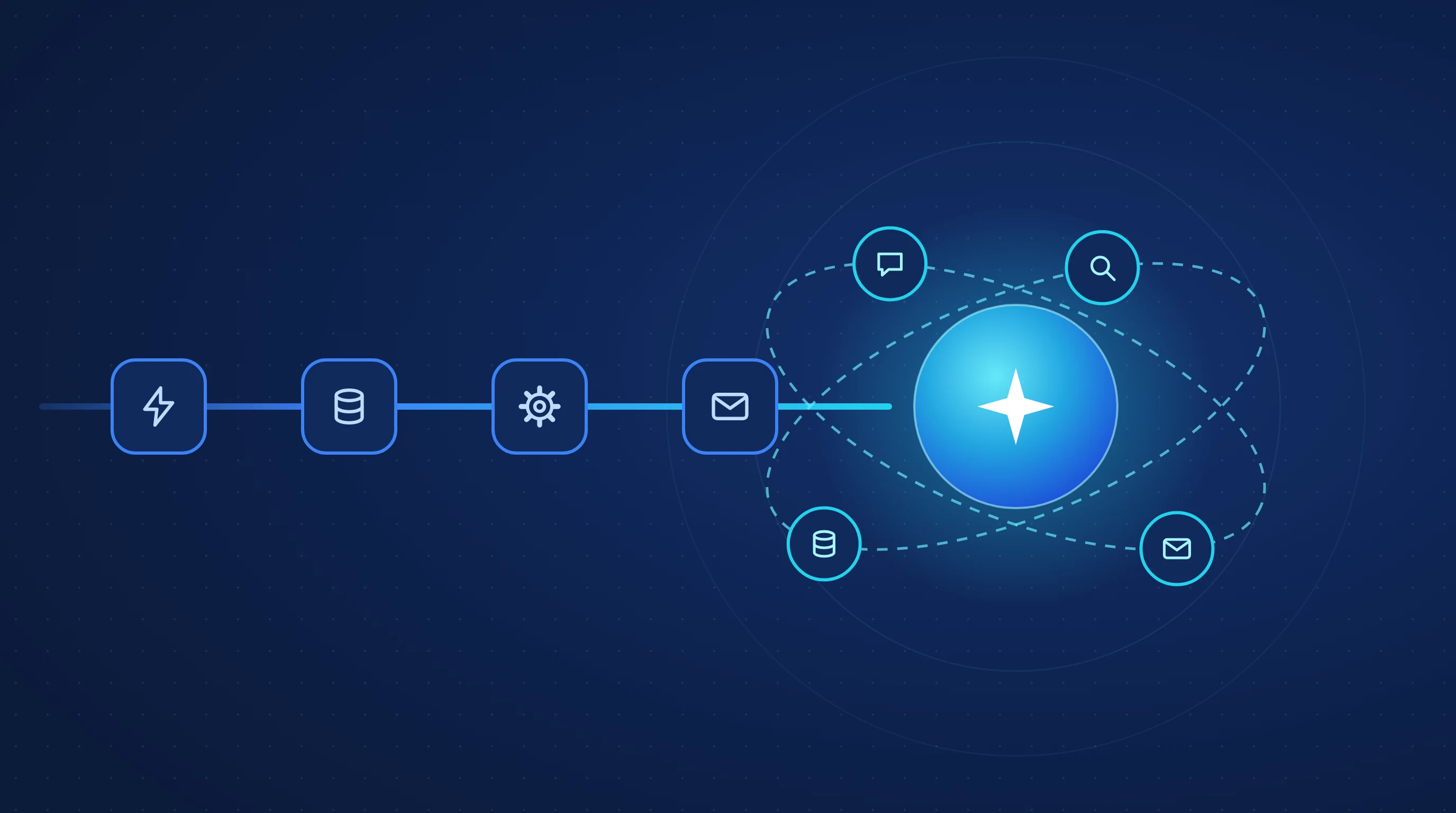
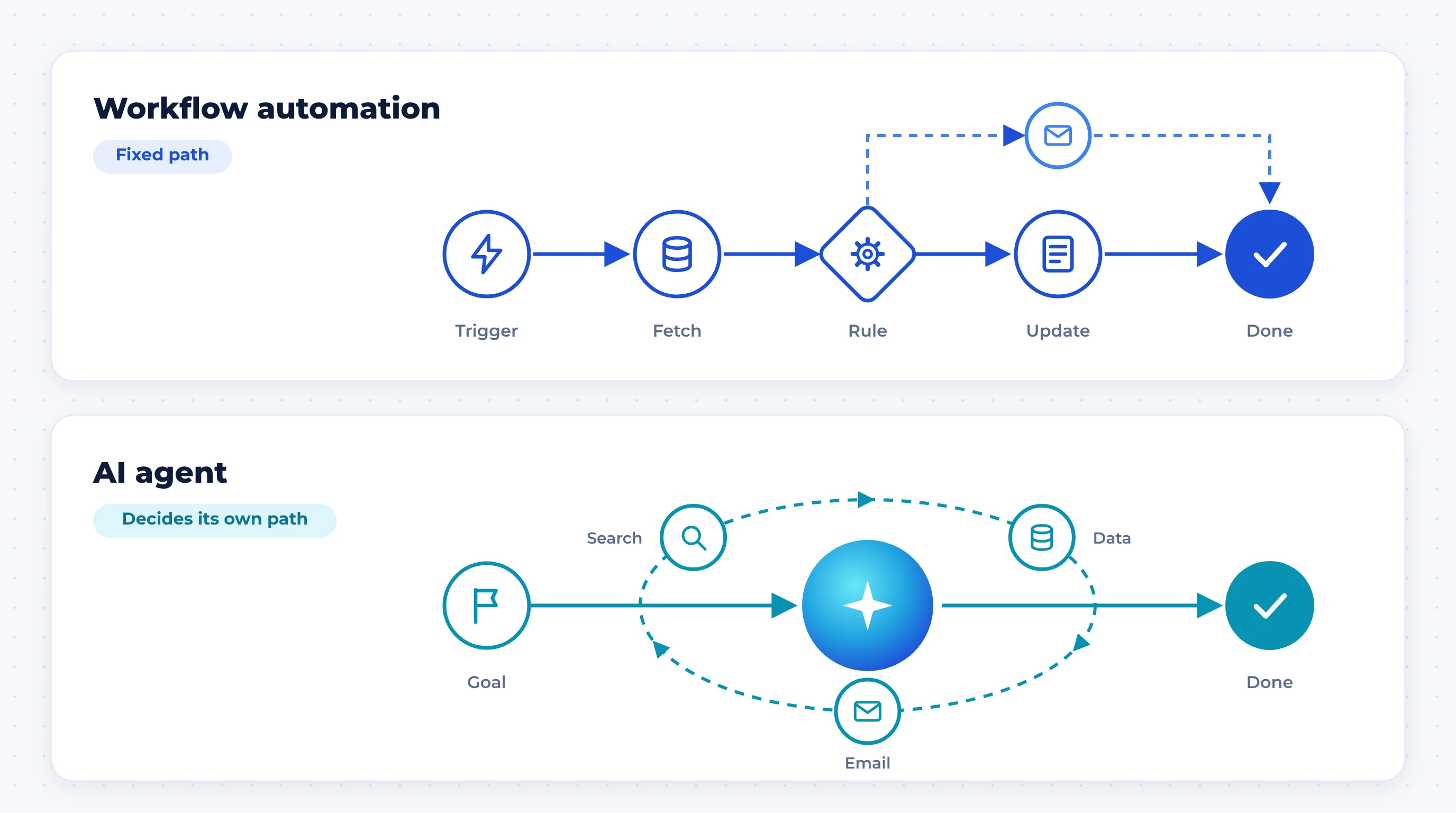
Workflow automation follows a path you design in advance. An AI agent decides its own path at run time. In a workflow, every step and branch is written down before it runs, so the same input always produces the same result. In an agent, a language model chooses which tools to use, in what order, and when it is finished.
Use workflow automation when you can draw the process as a flowchart. Use an AI agent only when the steps genuinely change from case to case and a wrong action is cheap to catch. Most real systems are a mix of both.
Key takeaways
- 1
The dividing line is who controls the path: your code (workflow) or the model (agent).
- 2
It is a spectrum, not a binary. Plain rules, a workflow with an AI step, an agentic workflow and a fully autonomous agent each suit different jobs.
- 3
Agents compound errors. At 95% accuracy per step, a 10-step task succeeds end to end only about 60% of the time.
- 4
Gartner expects more than 40% of agentic AI projects to be cancelled by the end of 2027, mostly over cost and unclear value.
- 5
The pattern that works in production is a deterministic workflow "spine" with an agent only at the one or two steps that need open-ended judgment.
What is workflow automation, and what is an AI agent?
The clearest definitions come from Anthropic's engineering guide, Building effective agents. It groups both under "agentic systems" but separates them by architecture. Workflows are systems where models and tools are "orchestrated through predefined code paths." Agents are systems where the model directs its own process and tool use, staying in control of how the task gets done.
Workflow automation
A workflow is a recipe. Something triggers it (a form submission, a new email, a scheduled time), and it runs a fixed sequence: fetch data, check a condition, write a record, send a message. Tools like n8n, Zapier, Make and custom backend jobs all live here. Branches exist, but you wrote every one of them.
What it is good at: speed, low cost per run, identical output for identical input, and a clean audit trail. When it breaks, you can see exactly which step failed.
AI agent
An agent is given a goal, a set of tools and some limits. It reads the situation, picks a tool, looks at the result, and decides what to do next. It keeps looping until it thinks the goal is met or it hits a stopping rule.
What it is good at: problems where you cannot list the steps ahead of time, such as a support conversation that might need a refund, a policy lookup or an escalation, depending on what the customer says.
The part most comparisons skip
A workflow can contain AI. A step that reads a CV and extracts skills, or drafts a reply for approval, is still a workflow, because your code decides what happens before and after that step. Calling that an "agent" is how a lot of vendor marketing blurs the line.
It's a spectrum: the four levels of automation
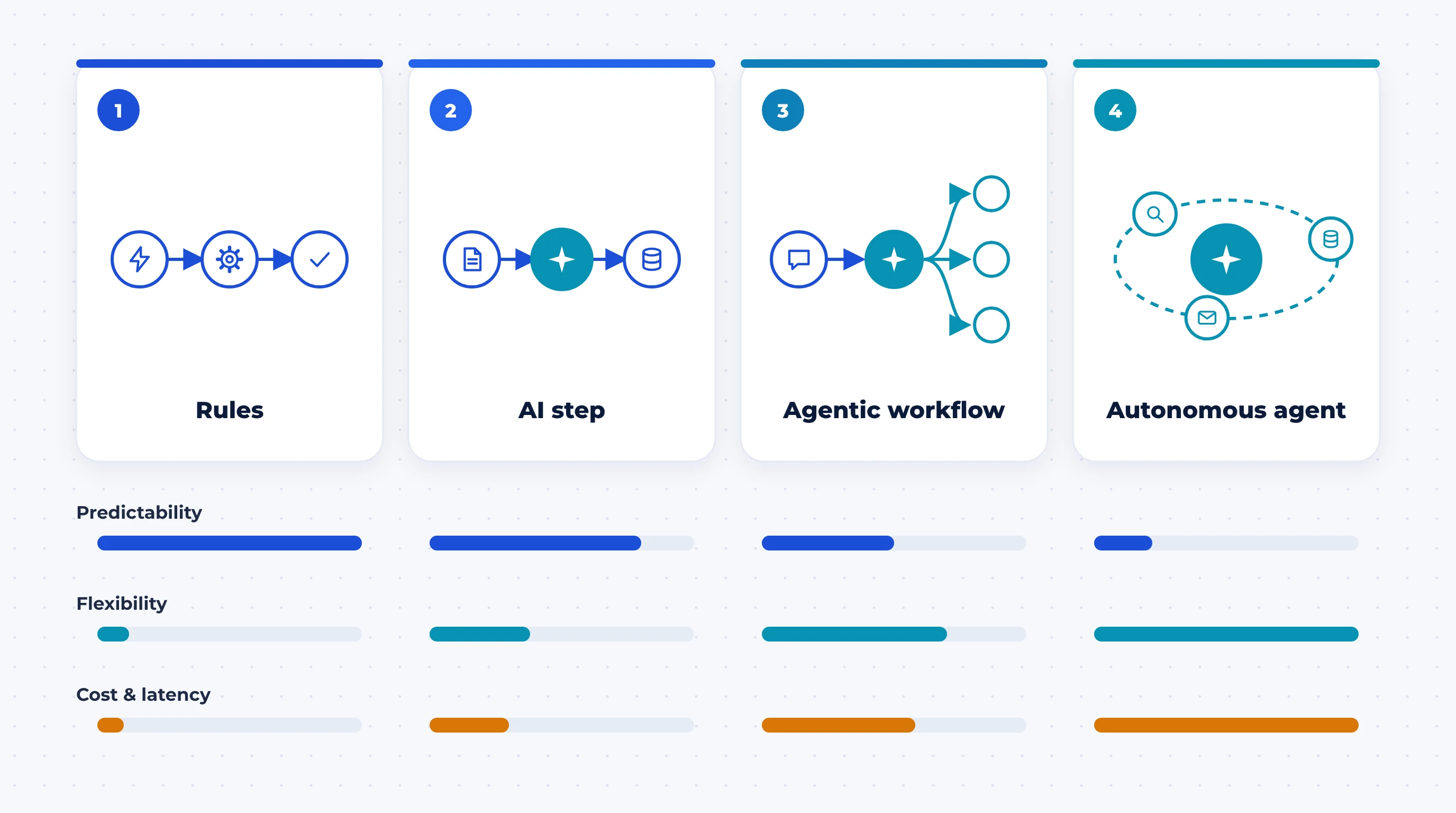
Instead of choosing between "automation" and "agent," place your process on a ladder. Each level up buys flexibility and pays for it in cost, latency and predictability.
Level 1: Rule-based automation
If-this-then-that logic on structured data. "When an invoice is marked paid in the accounting system, update the CRM and email the receipt." No AI involved, and none needed.
Level 2: Workflow with an AI step
The path is still fixed, but one step uses a model to handle unstructured input: classify an email, extract fields from a PDF, summarise a call, score a CV against a job description. This is where most businesses get the best return on AI today.
Level 3: Agentic workflow
The model makes limited decisions inside guardrails you set. It might route a ticket to one of five handlers, or break a research task into sub-tasks, but the set of possible actions is small and known.
Level 4: Autonomous agent
The model plans, acts and re-plans across many turns with real tools, potentially for minutes or hours. Coding agents and computer-use agents are the clearest examples. This level needs the most testing, monitoring and trust.
AI agent vs workflow automation: side-by-side comparison
| Factor | Workflow automation | AI agent |
|---|---|---|
| Who decides the next step | Your code | The model, at run time |
| Same input, same output? | Yes | Not guaranteed |
| Handles unexpected cases | Only the ones you planned for | Can improvise, for better or worse |
| Cost per run | Low and predictable | Variable; grows with every reasoning loop and tool call |
| Speed | Seconds | Seconds to minutes |
| Debugging | Find the failed step | Replay a reasoning trace |
| Typical failure | Stops with an error | Completes confidently with a wrong result |
| Best for | Repeatable processes with known steps | Open-ended tasks with variable steps |
| Examples | Invoice sync, lead routing, onboarding emails, report generation | Tier-1 support with actions, research, coding, screening conversations |
Why AI agents fail more often than the demo suggests
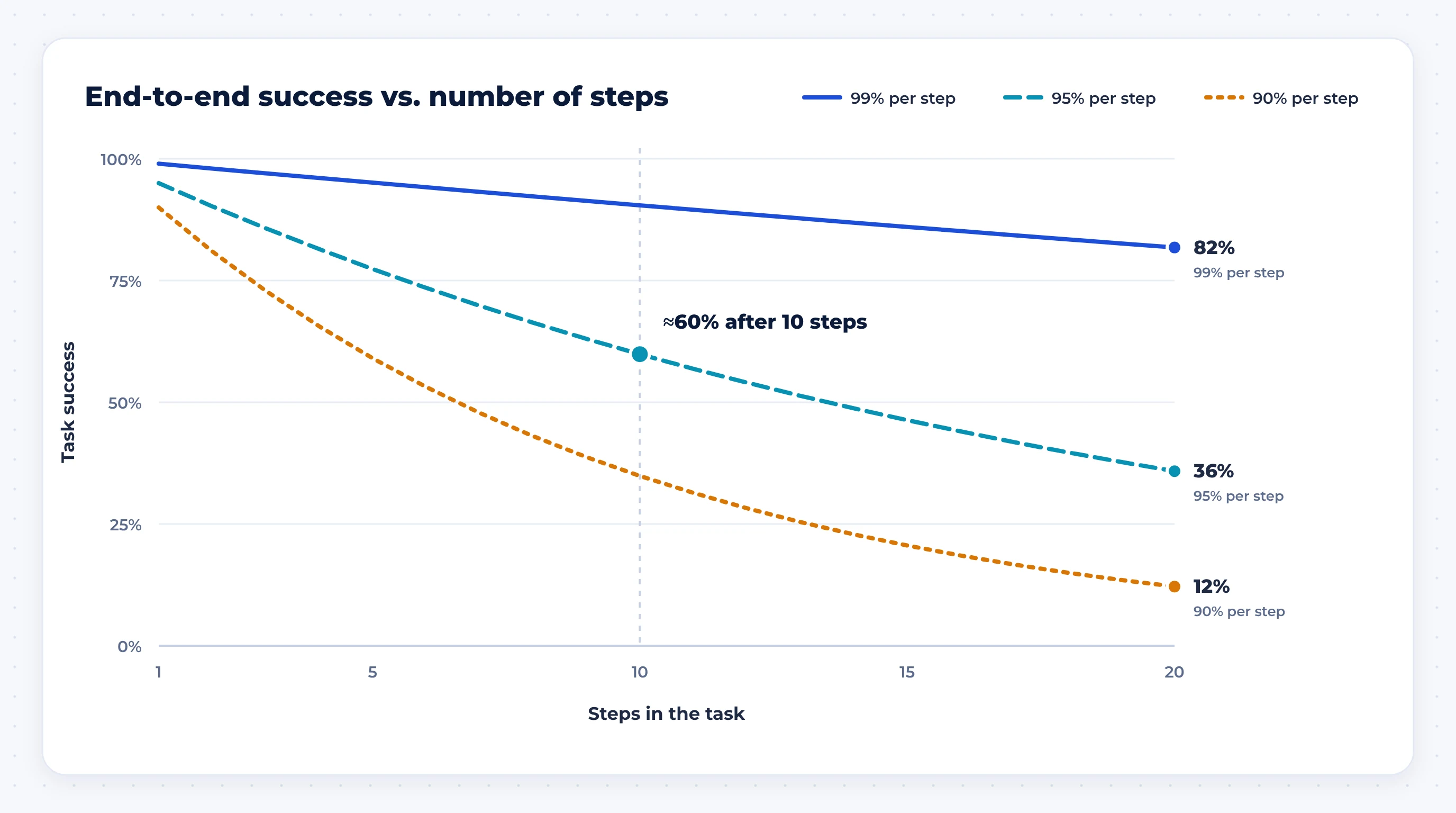
The single most useful idea for this decision is the compounding error problem. When an agent takes several dependent steps, the chance of success at each step multiplies.
Run the numbers yourself:
- 99% per step: about 90% success over 10 steps, about 82% over 20.
- 95% per step: about 60% over 10 steps, about 36% over 20.
- 90% per step: about 35% over 10 steps, about 12% over 20.
A workflow does not have this problem in the same way, because its deterministic steps succeed or fail outright, and only the AI steps carry probability.
The industry data points the same way:
- Benchmarks: Stanford's 2026 AI Index reports that on τ-bench, which tests tool use across multi-turn customer conversations, no model scored above 71% (VentureBeat).
- Consistency: Researchers have found that agents passing a task 60% of the time on one try may succeed on only 25% when the same task is repeated several times (ReliabilityBench). In production, you need the repeat performance, not the lucky run.
- Project outcomes: Gartner predicts more than 40% of agentic AI projects will be cancelled by the end of 2027 because of rising costs and unclear business value. It also warns about "agent washing," estimating that only about 130 of the thousands of vendors selling agentic AI offer real agentic capability (Reuters via The Star).
- Adoption reality: McKinsey's State of AI survey found 62% of organisations at least experimenting with AI agents, but no more than 10% scaling them in any single business function (McKinsey).
None of this means agents don't work. Gartner still expects agentic AI to make at least 15% of day-to-day work decisions by 2028. It means you should put an agent where its flexibility is worth the extra risk, and nowhere else.
When workflow automation is the right choice
Choose a workflow, with or without AI steps, when most of these are true:
- You can draw it. If a whiteboard flowchart covers 90% or more of real cases, a workflow will run it faster and cheaper than an agent.
- Mistakes are expensive or hard to undo. Payments, contracts, medical or legal records, anything customer-facing that cannot be recalled.
- Volume is high. Paying for model reasoning on thousands of identical runs a day adds up quickly when a rule would do.
- You need an audit trail. Regulators, finance teams and clients want to see exactly why something happened.
- The inputs are structured, or can be made structured by one AI extraction step.
Typical examples: syncing orders between e-commerce, ERP and accounting; routing inbound leads to the right salesperson; generating weekly reports; turning team check-in messages in a chat channel into attendance records; onboarding sequences for new customers or staff.
When an AI agent earns its place
Anthropic's guidance is to start with the simplest solution and add complexity only when it clearly improves results. It suggests agents fit open-ended problems where you can't predict how many steps a task needs or hard-code the path, and where you can trust the model's decisions. In its own customer work, the strongest agent use cases combine conversation with action, have clear success criteria, allow feedback loops and keep meaningful human oversight.
In practice, an agent is worth considering when:
- The path really varies. A support request might need one lookup or six, a refund or an escalation.
- The work is conversational. Screening calls, intake interviews, guided troubleshooting.
- Success is checkable. Code passes tests, the ticket gets resolved, the customer confirms.
- A wrong action is cheap to catch. Draft-for-approval, sandboxed actions, refunds under a cap.
The 5-question test: which one does your process need?
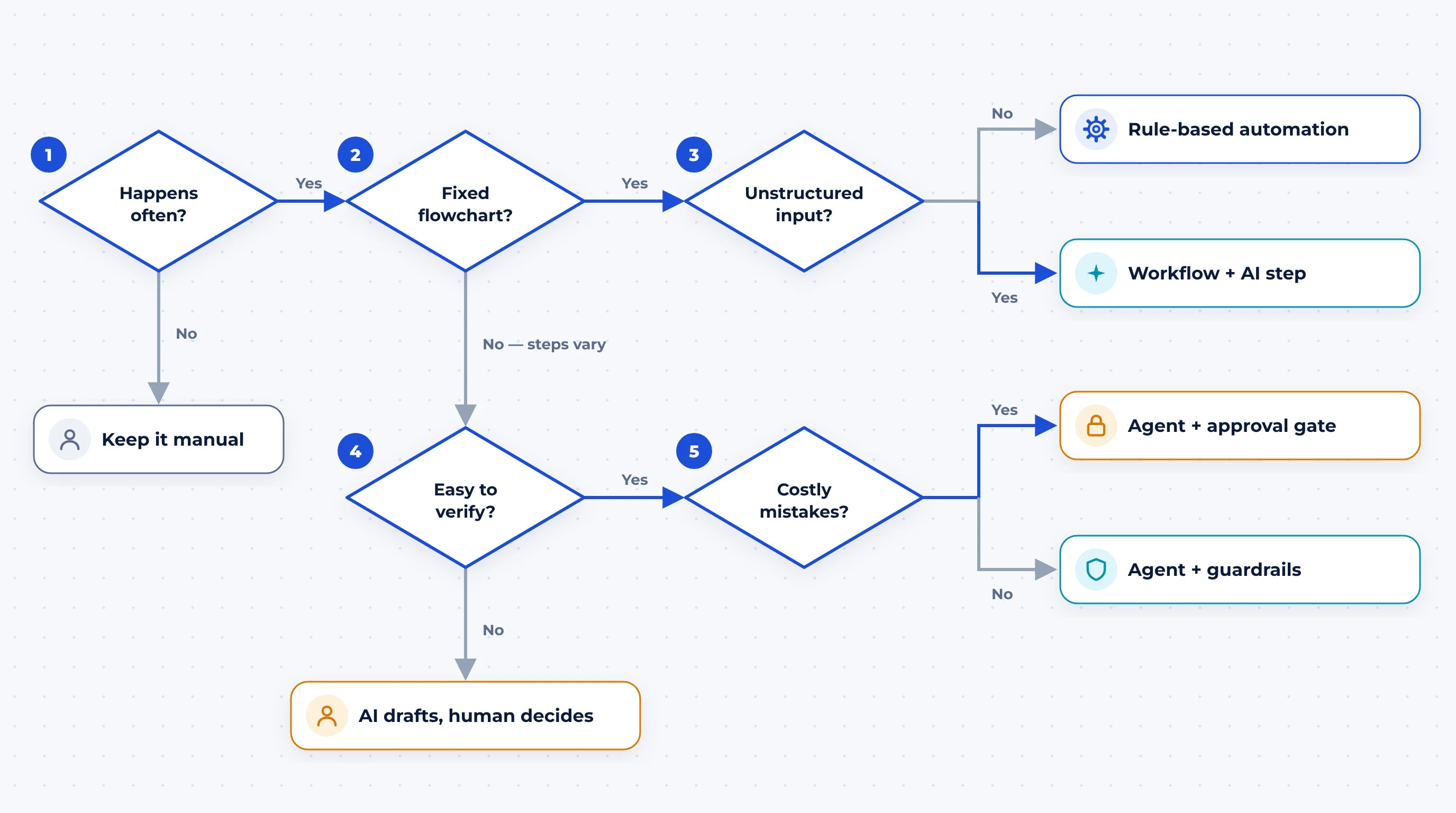
Answer these in order for the process you want to automate.
- 1
Does it happen often enough to be worth automating? A task that runs twice a month rarely repays the build. If not, leave it manual.
- 2
Can you draw it as a flowchart that covers almost every case? If yes, go to question 3. If the steps change from case to case, go to question 4.
- 3
Are the inputs unstructured, like emails, PDFs, CVs, chats or calls? If not, use rule-based automation. If they are, build a workflow with an AI step that turns them into structured data.
- 4
Can you check the result automatically or cheaply? If not, let AI draft and a human decide until you can measure quality.
- 5
Is a wrong action costly or irreversible? If yes, use an agent with a human approval gate before that action. If not, use an agent with guardrails: a narrow set of tools, a step limit and full logging.
Most processes end at question 3. That is a good outcome: you get most of the value of AI with the reliability of a workflow.
The pattern that works: a deterministic spine with an agent at the edge
The strongest production systems we see are hybrids. A workflow handles the sequence, state and records. An agent is used only at the step where open-ended judgment or conversation is genuinely needed, and its output is handed back to the workflow.
How we built our own hiring pipeline
We apply this rule to Greyloops' own recruitment. Hiring is a good test case because it mixes high-volume, repeatable steps with one step that is truly conversational.
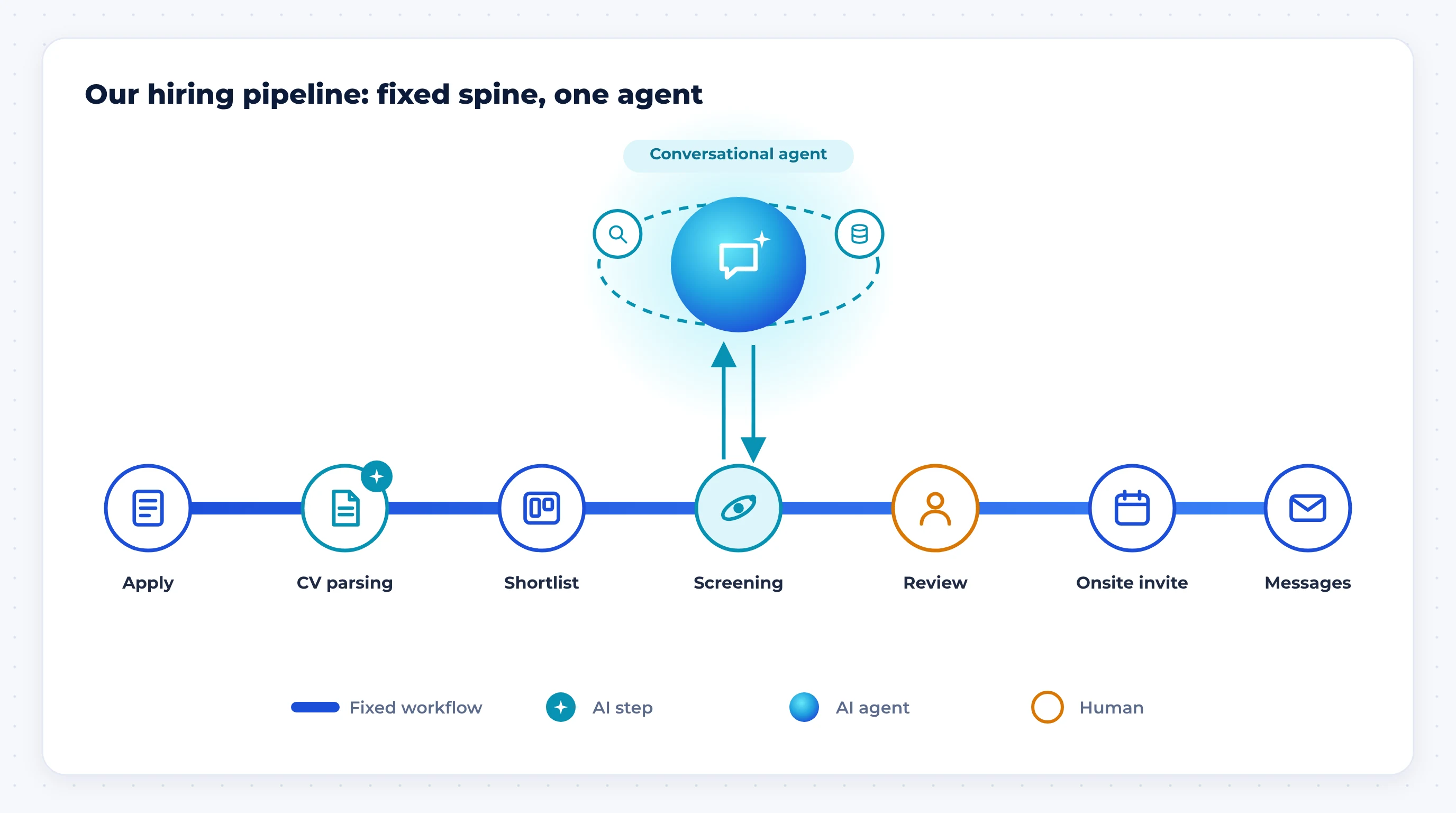
- Fixed workflow steps: Open roles live as cards on a Trello board, which also drives the careers page. Applications from the website land in Trello automatically. Scheduling, reminders and candidate messages follow fixed rules. We orchestrate this in n8n, so every move between stages is predictable and visible.
- AI step inside the workflow: CVs are unstructured, so a model reads each one and pulls out the details a recruiter needs. The workflow, not the model, decides what happens next.
- Agent only at the screening call: A first-round conversation is open-ended. Candidates ask questions, answers lead to follow-ups, and no flowchart covers it. This is the one stage where a conversational agent fits. Its output goes back into the pipeline for a human to review before anyone is invited onsite.
The result is a system where the agent can't skip a stage, lose a candidate or send an onsite invite on its own. If the agent has a bad conversation, it affects one screening, not the whole pipeline.
What each option really costs to run
Anthropic notes that agentic systems usually trade higher latency and cost for better performance on hard tasks. In practice, the costs break down like this:
- Rule-based automation: a platform subscription or hosting, plus build time. The cost per run is close to zero.
- Workflow with AI steps: the above, plus a model call per AI step. Because the number of calls per run is fixed, the cost per run is predictable.
- AI agent: model calls multiply with every reasoning loop and tool call, so cost per run varies with the case. Add the work most teams underestimate: test sets, evaluation, monitoring, guardrails and human review.
When you compare quotes, ask for the expected cost per successful outcome, not just the build price.
How to get started without wasting a quarter
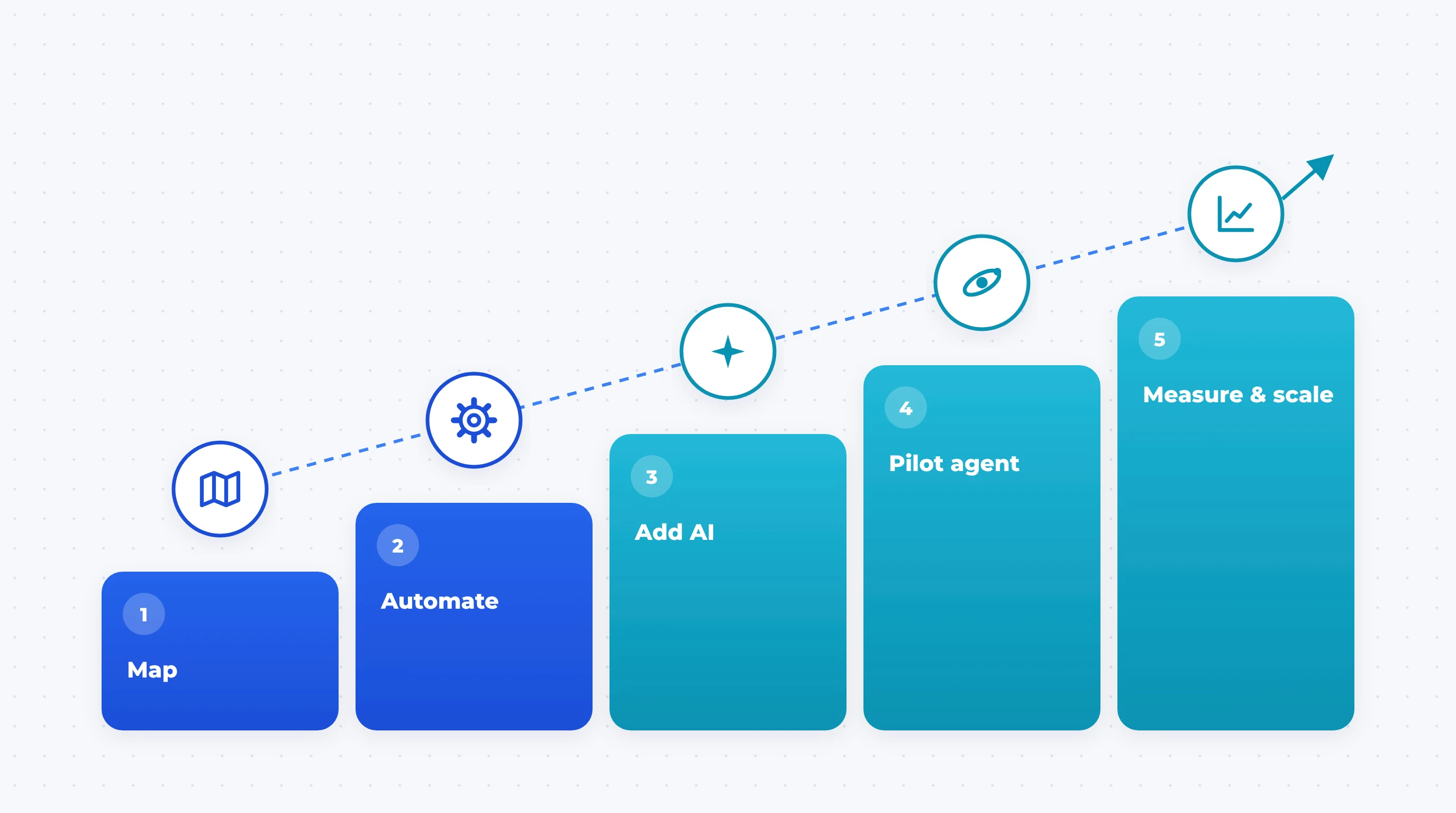
- 1
Map the process as it really runs today, including exceptions and who handles them.
- 2
Automate the fixed steps first. This usually delivers most of the time savings on its own.
- 3
Add AI steps where people read or write unstructured text.
- 4
Pilot one agent at one step, with a human approving its actions and a clear stopping rule.
- 5
Measure task success rate, cost per success and escalation rate, then decide whether to give the agent more autonomy.
Conclusion: build the simplest system that does the job
The question isn't whether AI agents are better than workflow automation. It is which parts of your process need a model's judgment and which need a reliable recipe. For most businesses in 2026, the answer is a solid workflow, AI steps where unstructured data comes in, and an agent only where the path can't be predicted. Start there, measure it, and give the system more autonomy when the results earn it.
Explore our AI and automation services
AI Agent vs Workflow Automation FAQs
Is ChatGPT an AI agent?
Not by default. A chat assistant that answers questions is a model responding to prompts. It becomes an agent when it is given tools, such as browsing, code execution or access to your systems, and is allowed to decide which to use and when, across several steps, to reach a goal.
Is n8n or Zapier an AI agent?
No. n8n, Zapier and Make are workflow automation platforms. They can call a language model as one step, and several now let you add an agent node inside a workflow. The platform is the workflow; the agent is one component you choose to put in it.
Are AI agents more expensive than workflow automation?
Usually, yes. A workflow's cost per run is close to fixed. An agent's cost grows with every reasoning loop and tool call, varies from case to case, and comes with extra spend on testing, monitoring and human review. Agents make financial sense when they replace expensive human judgment, not simple rules.
What is an agentic workflow?
An agentic workflow is a fixed process in which a model makes limited decisions at certain points, such as routing a request to one of several handlers or splitting a task into sub-tasks. It sits between a plain workflow and a fully autonomous agent, and for many business processes it is the best balance of flexibility and control.
What is agent washing?
Agent washing is the practice of rebranding existing chatbots, AI assistants or rule-based automation as "AI agents" without adding real autonomy. Gartner estimates that only about 130 of the thousands of agentic AI vendors offer genuine agentic capability. Ask any vendor what their system decides on its own and how they measure its success rate.
Do I need an AI agent for customer support?
For simple FAQs and order-status questions, a workflow with an AI step (classify, retrieve the answer, reply) is cheaper and more reliable. An agent makes sense when support conversations need multiple lookups and actions, such as checking an order, applying a policy and issuing a refund within a limit, and when you can measure resolution rates.
How do I make an AI agent safer in production?
Give it the smallest set of tools it needs, set a maximum number of steps, require human approval for irreversible actions, log every tool call so runs can be replayed, and test it on a fixed set of real cases before and after every change.
Sources
- Anthropic, Building effective agents
- Gartner, via Reuters: Over 40% of agentic AI projects will be scrapped by 2027
- McKinsey, The state of AI in 2025: Agents, innovation, and transformation
- Stanford AI Index 2026, via VentureBeat: Frontier models are failing one in three production attempts
- Gupta, ReliabilityBench: Evaluating LLM Agent Reliability Under Production-Like Stress Conditions